Update: Pydev now has a new Django integration. See: http://pydev.org/manual_adv_django.html
Ok, some time ago I've covered how to configure pydev to work with Turbogears, and since them, I've been having some requests to do the same for Django, so... here we go ;-)
As with Turbogears, I still don't have any previous experience working with Django, so, it may be good to see how easy it is to get started with it for others!
First step: get Django. Obvious place (after searching for it): http://www.djangoproject.com/
I started by reading the overview, and it seems to be straightforward... now on to something real: downloading it... it says it only needs python, but I didn't find information on which is the preferred version. I googled for it and it appears that it is still not working well with python 2.5, so, I'll go with python 2.4.
Second step: install
[C:\bin\Python24]python e:\Install\Dev.Python\Django-0.95\setup.py install
>> The required version of setuptools (>=0.6c1) is not available, and can't be installed while this script is running. Please install a more recent version first.
The tutorial says that it will attempt to grab setuptools if setuptools is not there, but unfortunatelly it seems it does not upgrade if a version is already there.
So, after googling a little, I found http://peak.telecommunity.com/DevCenter/EasyInstall#installing-easy-install and discovered that I had to download an ez_setup.py script and execute it. It appears to work without any problems, so, on to trying to install django again...
[C:\bin\Python24]python e:\Install\Dev.Python\Django-0.95\setup.py install
still gives me problems, because it requires me to be in the same folder where setup.py is...
[E:\Install\Dev.Python\Django-0.95]c:\bin\Python24\python.exe setup.py install
seems to solve it... smoke test: python -c "import django" seems to work ok
It also requires a database (as I'm just testing, pysqlite seems a good option -- I'm using version 2.3.0)
Now, on to re-configure the pydev interpreter to add those new paths... I'm kind of lazy, so, usually I just remove the interpreter and add it again, instead of figuring out just the new paths (I also thinks it's safer, as it gets all the folders it finds in the pythonpath automatically). More info on that at http://www.fabioz.com/pydev/manual_101_interpreter.html
Now, on to the actually doing something
To create a base project it provides a script, so let's do it:
django-admin.py startproject mysite
It created a 'mysite' folder with some files... still in the command line (inside the mysite folder), it says to start django with:
python manage.py runserver
And voila... it's running. Now, on to do that from inside Eclipse.
Eclipse requires your code to be under a project, so, the 'new pydev project' wizard should be used, pointing the project contents to the 'mysite' folder or to a parent folder. As there is usually much more than just code in a project -- like folders for python, c++, docs... and as in this example we surely won't have a c++ folder, the initial project structure became:
/mysite
/docs
/src <-- this is the folder that should be added to the project pythonpath (in the project properties)
/mysite <-- I moved the initial files to this folder (so that we can make "import mysite" as the src is added to the pythonpath)
-- for more details on creating a project and setting the project pythonpath, check: http://www.fabioz.com/pydev/manual_101_project_conf.html
Now, on to starting the server from within pydev:
If you just run the manage.py file (just open it and press F9), it will show you a message with its usage, so, run it once and then go to the menu: Run > Run... and select the 'mysite manage.py' run and put in the program arguments runserver.
Now, running it like that leaves us without any prompt inside of the Eclipse console. Taking a closer look in the django code, it appears to have an autoreloader structure (I guess that's something common to web-servers), so, as it is actually run in another process, we won't have any output. To fix this in the testing environment (after killing the process inside of Eclipse and the other process that is still running in the computer), we can just add another argument, so, now as arguments we have runserver --noreload
Note that the Eclipse console currently does not have a Ctrl+Break, so, you have to actually kill it in the red button in the console, and to re-run the last run, just use Ctrl+F11.
Now, on to set the sqlite parameters and create the actual database -- according to the tutorial, just set the engine and file to be used for sqlite and the on to:
python manage.py syncdb
-- I usually do that stuff on a separate prompt, as it is nice to run things inside of Eclipse, but having to change the argument for each different run is not all that nice (so, an open shell is always welcome)
and created a superuser... if you configured the auto-refresh for Eclipse as in http://www.fabioz.com/pydev/manual_101_eclipse.html, a new file should be appearing in the database file for sqlite -- if you pointed it to some file inside of your project (if you still haven't the auto-refresh configure, I really advise doing it, as it can be a pain having to F5 for it to refresh the folders when some external change is done to the filesystem)
Now, keeping on with the tutorial:
python manage.py startapp polls
and copied the example from the homepage. Defining the model seems straightforward, and code-completion / code-analysis should be already working ;-)
Making the syncdb again updates my sql with the new structure (pretty nice).
Now, adding the admin interface seems pretty straightforward, and without the auto-reload, the regular debugger works pretty well -- test it by putting a breakpoint after creating the __str__ function for the Poll class in the example and pressing F11 (used to debug the last run). If you want to keep the auto-reloader and still debug, you'll have to use the remote debugger that comes with the extensions to debug, as it does not rely on having the process started from Eclipse. Check http://www.fabioz.com/pydev/manual_adv_remote_debugger.html for more details.
And I guess that's it for the pydev configuration... code-completion, code-analysis, debugger, etc. should all be working.
You can now enjoy working with django inside of pydev!
Cheers,
Fabio
Showing posts sorted by relevance for query django. Sort by date Show all posts
Showing posts sorted by relevance for query django. Sort by date Show all posts
Friday, September 29, 2006

Sunday, March 21, 2010
Django on Pydev
The current nightly build (which will be 1.5.6) is already providing some special support for Django (special thanks to Leo Soto for providing a good base for building upon).
There are still some details until the final release, but I'd like to get some feedback before that.
The special support goes in the following:
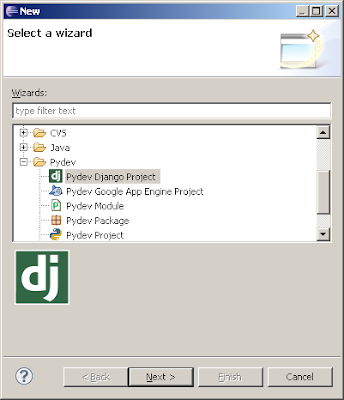
1. Create a 'Pydev Django' project (will use django to create a manage.py, settings.py and urls.py)
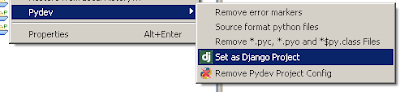
2. For an existing project, just right click it and choose 'Pydev > Set as Django project)'
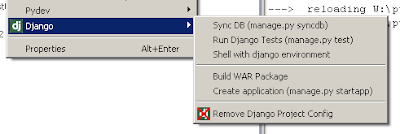
3. Custom Django actions can be accessed right clicking a project with the Django config and choosing Django > action.
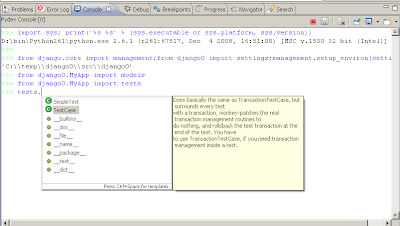
4. Note that the Shell with django environment will create a shell properly configured with your settings, providing the default features from the pydev shell, such as code completion, history, context assistants (ctrl+1), etc (see: http://pydev.org/manual_adv_interactive_console.html for more details)
5. Run as Django/Debug as Django are available (note that they set the --no-reload by default, otherwise the debugger may have some issues and other processes may be kept alive when closing the process spawned by Pydev).
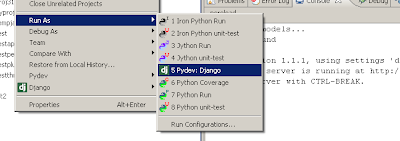
And that's it. It's all there in the nightly build already (I still have some features and minor adjustments to do, but that should already give a good idea of what will be available, and I'm waiting for feedback to know if there's something missing that really should be there).
There are still some details until the final release, but I'd like to get some feedback before that.
The special support goes in the following:
1. Create a 'Pydev Django' project (will use django to create a manage.py, settings.py and urls.py)

2. For an existing project, just right click it and choose 'Pydev > Set as Django project)'

3. Custom Django actions can be accessed right clicking a project with the Django config and choosing Django > action.

4. Note that the Shell with django environment will create a shell properly configured with your settings, providing the default features from the pydev shell, such as code completion, history, context assistants (ctrl+1), etc (see: http://pydev.org/manual_adv_interactive_console.html for more details)

5. Run as Django/Debug as Django are available (note that they set the --no-reload by default, otherwise the debugger may have some issues and other processes may be kept alive when closing the process spawned by Pydev).

And that's it. It's all there in the nightly build already (I still have some features and minor adjustments to do, but that should already give a good idea of what will be available, and I'm waiting for feedback to know if there's something missing that really should be there).
Thursday, August 19, 2010
Django Templates Editor
Note: The new recommended way of having a Django Templates Editor is by using LiClipse: http://brainwy.github.io/liclipse/ (which is a commercial counterpart made to keep PyDev supported, as such it has PyDev standalone and a bunch of other goodies builtin).
Aptana Studio 3 still has PyDev and its own Django Templates Editor, but the bundled PyDev version is not kept up to date.
Below are more details on the integration on Aptana Studio 3 (using the Aptana Themes)

The highlighted tokens are the ones defined in the templates in the "Django tags" context (so, tags to be highlighted can be added or removed).

Also, there's code completion based on templates for the django-templates related stuff and pretty nice html completions inherited from the Aptana html editor.
The image below shows the html completions, a django-templates template completion and its result and a django-templates template completion for the filters.

That's it for now. Please grab it and let me know if it's working or if there's a bug lying around there so that it can be fixed before the official release :)
Aptana Studio 3 still has PyDev and its own Django Templates Editor, but the bundled PyDev version is not kept up to date.
Below are more details on the integration on Aptana Studio 3 (using the Aptana Themes)
The highlighted tokens are the ones defined in the templates in the "Django tags" context (so, tags to be highlighted can be added or removed).
Also, there's code completion based on templates for the django-templates related stuff and pretty nice html completions inherited from the Aptana html editor.
The image below shows the html completions, a django-templates template completion and its result and a django-templates template completion for the filters.
That's it for now. Please grab it and let me know if it's working or if there's a bug lying around there so that it can be fixed before the official release :)
Tuesday, March 23, 2010
Django on Pydev (take #2)
It's nice that the previous post on Django on Pydev made so many people happy :)
There were many comments and I decided for writing a separate post to answer those and explain a bit better what should be the final state of the integration.
1. Django templates
There will be a special editor for that, but this will not be in the next release. This editor will be based upon the new Aptana Studio 3 (if you don't know about it, there's a preview explaining it at http://vimeo.com/channels/radrails#9895797). Initially it may be simpler (at least syntax highlighting and outline) and it should shape to have code-completion and other features in the future.
2. Custom Django actions
A new nightly has just been pushed with support for any custom action to manage.py. There's still room for improvement, like automatically going through the manage.py help and executing a command or asking help on that, but this won't be available for the upcoming release.
3. Code Analysis of Django
Most things should work as it is now, but I'm waiting for bug-reports saying what exactly Pydev fails to acknowledge on Django.
And that's it for the current plans... if there are more suggestions, they're very welcome!
There were many comments and I decided for writing a separate post to answer those and explain a bit better what should be the final state of the integration.
1. Django templates
There will be a special editor for that, but this will not be in the next release. This editor will be based upon the new Aptana Studio 3 (if you don't know about it, there's a preview explaining it at http://vimeo.com/channels/radrails#9895797). Initially it may be simpler (at least syntax highlighting and outline) and it should shape to have code-completion and other features in the future.
2. Custom Django actions
A new nightly has just been pushed with support for any custom action to manage.py. There's still room for improvement, like automatically going through the manage.py help and executing a command or asking help on that, but this won't be available for the upcoming release.
3. Code Analysis of Django
Most things should work as it is now, but I'm waiting for bug-reports saying what exactly Pydev fails to acknowledge on Django.
And that's it for the current plans... if there are more suggestions, they're very welcome!
Tuesday, November 20, 2012
Debugging SQL in Django (with PyDev)
I'm working on a Django project recently and one of the things that came up was debugging SQL statements a bit to see what was actually going on.
After researching a bit, I found: http://pypi.python.org/pypi/django-debug-toolbar, which when installed wraps around the calls that Django does to the DB and prints the actual SQL statements used.
I didn't really install it as a debug toolbar as it recommends, but I use it in the interactive console shell to see how things happen when I'm experimenting.
To do this, after installing it and adding 'debug_toolbar' to your INSTALLED_APPS in Django, one can start the interactive console shell with Django support (if you're in a Python editor just do: Ctrl+2 dj shell) and add write the import:
from debug_toolbar.management.commands import debugsqlshell
Now, when you do some operation that does an SQL operation, it'll be printed to the console, while having all the PyDev niceties on the console (such as code-completion). Pretty nice.
After researching a bit, I found: http://pypi.python.org/pypi/django-debug-toolbar, which when installed wraps around the calls that Django does to the DB and prints the actual SQL statements used.
I didn't really install it as a debug toolbar as it recommends, but I use it in the interactive console shell to see how things happen when I'm experimenting.
To do this, after installing it and adding 'debug_toolbar' to your INSTALLED_APPS in Django, one can start the interactive console shell with Django support (if you're in a Python editor just do: Ctrl+2 dj shell) and add write the import:
from debug_toolbar.management.commands import debugsqlshell
Now, when you do some operation that does an SQL operation, it'll be printed to the console, while having all the PyDev niceties on the console (such as code-completion). Pretty nice.
Wednesday, April 21, 2010
Identifying your editors
Now that Django support is available, there are some niceties being added to make life more pleasant when dealing with files with the same name, which are very common when developing with Django (or any other application in the case of __init__.py).
There are 2 levels of support for those cases:
1. Really common files (__init__.py or in Django projects models.py, tests.py and views.py) have a special option in which the title of the editor is no longer the file name, but the name of the package containing that file, while a different icon is shown for those files (as the image below shows).

2. If there are 2 files that would be shown with the same name, PyDev will change the title of both to contain not only the name of the file, but also the name of the parent package.

Those options can be tweaked at the preferences (hope those are self-explanatory):

And with the icon available you already know it's Python right? -- So, there's an option to hide the file extensions from the tab title.
Those features are already available in the current nightly build (and will be available in the 1.5.7 release).
Hope you enjoy!
There are 2 levels of support for those cases:
1. Really common files (__init__.py or in Django projects models.py, tests.py and views.py) have a special option in which the title of the editor is no longer the file name, but the name of the package containing that file, while a different icon is shown for those files (as the image below shows).
2. If there are 2 files that would be shown with the same name, PyDev will change the title of both to contain not only the name of the file, but also the name of the parent package.

Those options can be tweaked at the preferences (hope those are self-explanatory):
And with the icon available you already know it's Python right? -- So, there's an option to hide the file extensions from the tab title.
Those features are already available in the current nightly build (and will be available in the 1.5.7 release).
Hope you enjoy!
Thursday, April 01, 2010
Pydev 1.5.6 released / Django integration available
Pydev 1.5.6 has just been released (it's the same version as the last nightly build, so, if you were already in the last nightly build, there will be no upgrade available).
As commented before, the major highlight in this release is the Django integration.
There are more details on that at: http://pydev.org/manual_adv_django.html
Other additions worth commenting are:
* The go to definition (F3) now works with unsaved buffers
* Some improvements were done in the auto-edition to automatically close literals
* On backspace, the closing literal or parenthesis may be deleted
* Ctrl+2+s word to search can be used to search for a string in open editors (and that can no longer be done through the find/replace dialog)
Enjoy.
As commented before, the major highlight in this release is the Django integration.
There are more details on that at: http://pydev.org/manual_adv_django.html
Other additions worth commenting are:
* The go to definition (F3) now works with unsaved buffers
* Some improvements were done in the auto-edition to automatically close literals
* On backspace, the closing literal or parenthesis may be deleted
* Ctrl+2+s word to search can be used to search for a string in open editors (and that can no longer be done through the find/replace dialog)
Enjoy.
Tuesday, August 26, 2014
PyDev 3.7.0, PyDev/PyCharm Debugger merge, Crowdfunding
PyDev 3.7.0 was just released.
There are some interesting things to talk about in this release...
The first is that the PyDev debugger was merged with the fork which was used in PyCharm. The final code for the debugger (and the interactive console) now lives at: https://github.com/fabioz/PyDev.Debugger. This effort was backed-up by Intellij, and from now on, work on the debugger from either front (PyDev or PyCharm) should benefit both -- pull requests are also very welcome :)
With this merge, PyDev users will gain GEvent debugging and breakpoints at Django templates (but note that the breakpoints can only be added through the LiClipse HTML/Django Templates editor), and in the interactive console front (which was also part of this merge), the asynchronous output and console interrupt are new.
This release also changed the default UI for the PyDev editor (and for LiClipse editors too), so, the minimap (which had a bunch of enhancements) is now turned on by default and the scrollbars are hidden by default -- those that prefer the old behavior must change the settings on the minimap preferences to match the old style.
Also noteworthy is that the code-completion for all letter chars is turned on by default (again, users that want the old behavior have to uncheck that setting from the code completion preferences page), and this release also has a bunch of bugfixes.
Now, I haven't talked about the crowdfunding for keeping the support on PyDev and a new profiler UI (https://sw-brainwy.rhcloud.com/support/pydev-2014) after it finished... well, it didn't reach its full goal -- in practice that means the profiler UI will still be done and users which supported it will receive a license to use it, but it won't be open source... all in all, it wasn't that bad either, it got halfway through its target and many people seemed to like the idea -- in the end I'll know if keeping it on even if not having the full target reached was a good idea or not only after it's commercially available (as the idea is that new licenses will be what will cover for its development expenses and will keep it going afterwards).
A note for profiler contributors is that I still haven't released an early-release version, but I'm working on it :)
As for PyDev, the outcome of the funding also means I have fewer resources to support it than I'd like, but given that LiClipse (http://brainwy.github.io/liclipse/) provides a share of its earnings to support PyDev and latecomers can still contribute through http://pydev.org/, I still hope that I won't need to lower its support (which'd mean taking on other projects in the time I currently have for PyDev), and I think it'll still be possible to do the things outlined in the crowdfunding regarding it.
There are some interesting things to talk about in this release...
The first is that the PyDev debugger was merged with the fork which was used in PyCharm. The final code for the debugger (and the interactive console) now lives at: https://github.com/fabioz/PyDev.Debugger. This effort was backed-up by Intellij, and from now on, work on the debugger from either front (PyDev or PyCharm) should benefit both -- pull requests are also very welcome :)
With this merge, PyDev users will gain GEvent debugging and breakpoints at Django templates (but note that the breakpoints can only be added through the LiClipse HTML/Django Templates editor), and in the interactive console front (which was also part of this merge), the asynchronous output and console interrupt are new.
This release also changed the default UI for the PyDev editor (and for LiClipse editors too), so, the minimap (which had a bunch of enhancements) is now turned on by default and the scrollbars are hidden by default -- those that prefer the old behavior must change the settings on the minimap preferences to match the old style.
Also noteworthy is that the code-completion for all letter chars is turned on by default (again, users that want the old behavior have to uncheck that setting from the code completion preferences page), and this release also has a bunch of bugfixes.
Now, I haven't talked about the crowdfunding for keeping the support on PyDev and a new profiler UI (https://sw-brainwy.rhcloud.com/support/pydev-2014) after it finished... well, it didn't reach its full goal -- in practice that means the profiler UI will still be done and users which supported it will receive a license to use it, but it won't be open source... all in all, it wasn't that bad either, it got halfway through its target and many people seemed to like the idea -- in the end I'll know if keeping it on even if not having the full target reached was a good idea or not only after it's commercially available (as the idea is that new licenses will be what will cover for its development expenses and will keep it going afterwards).
A note for profiler contributors is that I still haven't released an early-release version, but I'm working on it :)
As for PyDev, the outcome of the funding also means I have fewer resources to support it than I'd like, but given that LiClipse (http://brainwy.github.io/liclipse/) provides a share of its earnings to support PyDev and latecomers can still contribute through http://pydev.org/, I still hope that I won't need to lower its support (which'd mean taking on other projects in the time I currently have for PyDev), and I think it'll still be possible to do the things outlined in the crowdfunding regarding it.
Tuesday, March 02, 2010
Preparing for upcoming release (testers needed)
Pydev 1.5.5 is getting near a new release. The current nightly build (1.5.5.2010030222) should be the released version if no critical bugs are found until Thursday.
The major highlights for this release are:
1. The contents of the interpreter PYTHONPATH are all shown in the Pydev Package explorer (so, the contents of those modules can be seen, including zip file contents)
2. Predefined completions can be used in Pydev. Those are plain Python 3.0 files with the interface for modules, and there's a choice where Pydev creates those files from QScintilla .api files (see: unpublished instructions at git for more details)
3. The find/replace dialog in Pydev has a new button which can be used for finding the current string being searched for in the currently opened editors (although because of an Eclipse limitation it doesn't work on external files, just editors opened with files under a project).
4. Improved hover support for compiled modules.
Well, that's it for this release.
For the next release, the focus will be on a special Django integration in Pydev.
Leo Soto has been working for some time on it already and I was eagerly waiting for it (available at http://github.com/leosoto/Pydev/tree/bingo), so, the next release will be integrating that branch into Pydev and making it as smooth as possible for Django developers inside of Pydev.
The major highlights for this release are:
1. The contents of the interpreter PYTHONPATH are all shown in the Pydev Package explorer (so, the contents of those modules can be seen, including zip file contents)
2. Predefined completions can be used in Pydev. Those are plain Python 3.0 files with the interface for modules, and there's a choice where Pydev creates those files from QScintilla .api files (see: unpublished instructions at git for more details)
3. The find/replace dialog in Pydev has a new button which can be used for finding the current string being searched for in the currently opened editors (although because of an Eclipse limitation it doesn't work on external files, just editors opened with files under a project).
4. Improved hover support for compiled modules.
Well, that's it for this release.
For the next release, the focus will be on a special Django integration in Pydev.
Leo Soto has been working for some time on it already and I was eagerly waiting for it (available at http://github.com/leosoto/Pydev/tree/bingo), so, the next release will be integrating that branch into Pydev and making it as smooth as possible for Django developers inside of Pydev.
Friday, November 09, 2018
PyDev 7.0 (mypy, black, pipenv, faster debugger)
PyDev 7.0 (actually, PyDev 7.0.3 after some critical bugfixes on 7.0.0) is now available.
Some of the improvements available in this version include:
Mypy may be used as an additional backend for code analysis (see the preferences in the Preferences > PyDev > Editor > Code Analysis > Mypy). It is is similar to the PyLint integration, and will run Mypy whenever a file is saved in the editor.
Black can be used as the code-formatting engine (so, it's now possible to choose between the PyDev formatter, autopep8 or Black).
pipenv may be used for managing virtual environments (so, when creating a new project, clicking to configure an interpreter not listed will present an option to create a new interpreter with pipenv).
Improvements managing interpreters: it's now possible to manage interpreters directly from the editor (so, for instance, doing ctrl+2 pip install django will use pip to install django in the interpreter related to the opened editor -- and it's possible to change pip for conda or pipenv too).
Debugger improvements
The debugger is much faster for Python 3.6 onwards (when cython compiled extensions are available).
The performance improvement on the debugger is due to the using the frame eval mode for breakpoints again.
To give some history, that mode was previously disabled on pydevd because it had some issues which made function calls much slower (even though line stepping was zero overhead), but in the end, that overhead could make the performance worse than just using the plain tracing mode. Also, it had a big memory leak and in the cases where the tracing mode had to be reenabled both modes would be active at the same time and performance would suffer quite a bit.
-- all of those should be fixed and it should now perform better or at least on par with the tracing mode with cython in all scenarios... if you like numbers, see: https://github.com/fabioz/PyDev.Debugger/blob/master/tests_python/performance_check.py#L193 for some benchmarks.
p.s.: the improvements in the Debugger were sponsored by Microsoft, as the PyDev Debugger is used as the core of ptvsd, the Python debugger package used by Python in Visual Studio and the Python Extension for Visual Studio Code.
Thursday, March 23, 2017
PyDev 5.6.0 released: faster debugger, improved type inference for super and pytest fixtures
PyDev 5.6.0 is now already available for download (and is already bundled in LiClipse 3.5.0).
There are many improvements on this version!
The major one is that the PyDev.Debugger got some attention and should now be 60%-100% faster overall -- in all supported Python versions (and that's on top of the improvements done previously).
This improvement was a nice example of trading memory vs speed (the major change done was that the debugger now has 2 new caches, one for saving whether a frame should be skipped or not and another to save whether a given line in a traced frame should be skipped or not, which enables the debugger to make much less checks on those occasions).
Also, other fixes were done in the debugger. Namely:
Note: from this version onward, the debugger will now only support Python 2.6+ (I believe there should be very few Python 2.5 users -- Python 2.6 itself stopped being supported in 2013, so, I expect this change to affect almost no one -- if someone really needs to use an older version of Python, it's always possible to get an older version of the IDE/debugger too). Also, from now on, supported versions are actually properly tested on the ci (2.6, 2.7 and 3.5 in https://travis-ci.org/fabioz/PyDev.Debugger and 2.7, 3.5 in https://ci.appveyor.com/project/fabioz/pydev-debugger).
The code-completion (Ctrl+Space) and find definition (F3) also had improvements and can now deal with the Python super (so, it's possible to get completions and go to the definition of a method declared in a superclass when using the super construct) and pytest fixtures (so, if you have a pytest fixture, you should now be able to have completions/go to its definition even if you don't add a docstring to the parameter saying its expected type).
Also, this release improved the support in third-party packages, so, coverage, pycodestyle (previously pep8.py) and autopep8 now use the latest version available. Also, PyLint was improved to use the same thread pool used in code-analysis and an issue in the Django shell was fixed when django >= 1.10.
And to finish, the preferences for running unit-tests can now be saved to the project or user settings (i.e.: preferences > PyDev > PyUnit > Save to ...) and an issue was fixed when coloring the matrix multiplication operator (which was wrongly recognized as a decorator).
Thank you very much to all the PyDev supporters and Patrons (http://www.patreon.com/fabioz), who help to keep PyDev moving forward and to JetBrains, which sponsored many of the improvements done in the PyDev.Debugger.
There are many improvements on this version!
The major one is that the PyDev.Debugger got some attention and should now be 60%-100% faster overall -- in all supported Python versions (and that's on top of the improvements done previously).
This improvement was a nice example of trading memory vs speed (the major change done was that the debugger now has 2 new caches, one for saving whether a frame should be skipped or not and another to save whether a given line in a traced frame should be skipped or not, which enables the debugger to make much less checks on those occasions).
Also, other fixes were done in the debugger. Namely:
- the variables are now properly displayed when the interactive console is connected to a debug session;
- it's possible to select the Qt version for which QThreads should be patched for the debugger to work with (in preferences > PyDev > Debug > Qt Threads);
- fixed an issue where a native Qt signal is not callable message was raised when connecting a signal to QThread.started.
- fixed issue displaying variable (Ctrl+Shift+D) when debugging.
Note: from this version onward, the debugger will now only support Python 2.6+ (I believe there should be very few Python 2.5 users -- Python 2.6 itself stopped being supported in 2013, so, I expect this change to affect almost no one -- if someone really needs to use an older version of Python, it's always possible to get an older version of the IDE/debugger too). Also, from now on, supported versions are actually properly tested on the ci (2.6, 2.7 and 3.5 in https://travis-ci.org/fabioz/PyDev.Debugger and 2.7, 3.5 in https://ci.appveyor.com/project/fabioz/pydev-debugger).
The code-completion (Ctrl+Space) and find definition (F3) also had improvements and can now deal with the Python super (so, it's possible to get completions and go to the definition of a method declared in a superclass when using the super construct) and pytest fixtures (so, if you have a pytest fixture, you should now be able to have completions/go to its definition even if you don't add a docstring to the parameter saying its expected type).
Also, this release improved the support in third-party packages, so, coverage, pycodestyle (previously pep8.py) and autopep8 now use the latest version available. Also, PyLint was improved to use the same thread pool used in code-analysis and an issue in the Django shell was fixed when django >= 1.10.
And to finish, the preferences for running unit-tests can now be saved to the project or user settings (i.e.: preferences > PyDev > PyUnit > Save to ...) and an issue was fixed when coloring the matrix multiplication operator (which was wrongly recognized as a decorator).
Thank you very much to all the PyDev supporters and Patrons (http://www.patreon.com/fabioz), who help to keep PyDev moving forward and to JetBrains, which sponsored many of the improvements done in the PyDev.Debugger.
Monday, June 27, 2011
PyDev 2.2.0 released
It's out already.
This release is the first to add support for Eclipse 3.7 (which has just been released too).
The major feature added was the exception breakpoints handling (so, it's now possible to stop the debugger on caught or uncaught exceptions -- the UI for it may be accessed at the menu Run > Manage Python Exception Breakpoints).
The debugger should also be a bit faster (and some bugs related to multithreaded debugging were fixed).
For those using Django, some utilities were added so that it's possible to easily do a (remote) debug session with auto-reload enabled (see details at: http://pydev.org/manual_adv_remote_debugger.html#django-remote-debugging-with-auto-reload)
And as usual, a bunch of minor bugs were also fixed.
This release is the first to add support for Eclipse 3.7 (which has just been released too).
The major feature added was the exception breakpoints handling (so, it's now possible to stop the debugger on caught or uncaught exceptions -- the UI for it may be accessed at the menu Run > Manage Python Exception Breakpoints).
The debugger should also be a bit faster (and some bugs related to multithreaded debugging were fixed).
For those using Django, some utilities were added so that it's possible to easily do a (remote) debug session with auto-reload enabled (see details at: http://pydev.org/manual_adv_remote_debugger.html#django-remote-debugging-with-auto-reload)
And as usual, a bunch of minor bugs were also fixed.
Tuesday, September 07, 2010
Pydev 1.6.2 released
The latest Pydev version is out.
The Django Templates Editor is the major thing in this release, supporting html files with html, css and javascript.
The current Pydev is now also integrated in Aptana Studio 3, so, a full download where Pydev (with the Django templates editor) is already pre-installed is available at: http://aptana.com/products/studio3/download.
Also noteworthy is that the Python 2.7 grammar is fully supported (and a bunch of bug fixes have been made available).
The Django Templates Editor is the major thing in this release, supporting html files with html, css and javascript.
The current Pydev is now also integrated in Aptana Studio 3, so, a full download where Pydev (with the Django templates editor) is already pre-installed is available at: http://aptana.com/products/studio3/download.
Also noteworthy is that the Python 2.7 grammar is fully supported (and a bunch of bug fixes have been made available).
Wednesday, April 07, 2010
Pydev and virtualenv
A doubt that arises sometimes is how to use Pydev with virtualenv, so, here we go...
For those that don't know about it, virtualenv is a Python tool that allows one to configure a new Python interpreter that's 'sandboxed' based on an existing interpreter.
Sample use of virtualenv:
Say you have an interpreter in d:\bin\python26 (with easy_install in place).
You could do d:\bin\python26\scripts\easy_install.exe virtualenv to install virtualenv and later do:
d:\bin\Python26\Scripts\virtualenv.exe d:\bin\Python26django, which would create a new Python install at d:\bin\Python26django.
Later, you could add new libraries just at that Python install without disturbing the base install.
E.g.:
d:\bin\Python26django\Scripts\easy_install-2.6.exe django would install django at that interpreter without changing the default one.
Now, as far as Pydev is concerned, there's nothing special in configuring a regular interpreter or an interpreter available through virtualenv. It's just a matter of following the default steps (available at http://pydev.org/manual_101_interpreter.html) but pointing to the interpreter created by virtualenv (in this case d:\bin\Python26django\scripts\python.exe).
Note: For linux users, the instructions should be similar, but the created folder by virtualenv doesn't put the interpreter at a 'scripts' folder, but at a 'bin' folder.
Update: Note that when selecting a virtualenv interpreter, the folders from the base install won't come checked by default when adding the interpreter, so, those have to be manually selected.
For those that don't know about it, virtualenv is a Python tool that allows one to configure a new Python interpreter that's 'sandboxed' based on an existing interpreter.
Sample use of virtualenv:
Say you have an interpreter in d:\bin\python26 (with easy_install in place).
You could do d:\bin\python26\scripts\easy_install.exe virtualenv to install virtualenv and later do:
d:\bin\Python26\Scripts\virtualenv.exe d:\bin\Python26django, which would create a new Python install at d:\bin\Python26django.
Later, you could add new libraries just at that Python install without disturbing the base install.
E.g.:
d:\bin\Python26django\Scripts\easy_install-2.6.exe django would install django at that interpreter without changing the default one.
Now, as far as Pydev is concerned, there's nothing special in configuring a regular interpreter or an interpreter available through virtualenv. It's just a matter of following the default steps (available at http://pydev.org/manual_101_interpreter.html) but pointing to the interpreter created by virtualenv (in this case d:\bin\Python26django\scripts\python.exe).
Note: For linux users, the instructions should be similar, but the created folder by virtualenv doesn't put the interpreter at a 'scripts' folder, but at a 'bin' folder.
Update: Note that when selecting a virtualenv interpreter, the folders from the base install won't come checked by default when adding the interpreter, so, those have to be manually selected.
Friday, December 14, 2012
Prototyping a class in Python
I'm not sure what's the name for this technique (for me it resembles what is called prototyping in javascript -- I know it's not the same, but the fact is that you're building your class outside of it, although in Python it's still in its declaration step).
Anyways, the idea is the following: you want to change the class attributes before it becomes final -- there are things you just can't do in Python after a class is already declared (Python uses this technique for creating properties -- in my specific use-case I'm using it to overcome some limitations that Django has in its model inheritance with fields, but I've already used this many times).
The idea is the following: you get the frame which is being used inside the class declaration and change the locals in it so that the final created class will have the things you declared.
I.e.: This code:
Is the same as:
-- Just more complicated and more flexible -- in my case, it'll properly help me to choose how to create and customize the fields of a Django model class without having to copy and paste a bunch of code.
On a separate note, blogspot just sucks for code... why can't they simply create an option to add a piece of code? I'm now manually putting my code in html as described in http://stackoverflow.com/a/8697421/110451 -- it'd certainly be trivial for the blogspot devs to put a button which would do that for me right? (colors would be nicer, but this is the easiest things that just works for me and I'd already settle for it if blogger added it -- I know blogger has the quotes, but I want the code at least on a box with a monospaced font).
Anyways, the idea is the following: you want to change the class attributes before it becomes final -- there are things you just can't do in Python after a class is already declared (Python uses this technique for creating properties -- in my specific use-case I'm using it to overcome some limitations that Django has in its model inheritance with fields, but I've already used this many times).
The idea is the following: you get the frame which is being used inside the class declaration and change the locals in it so that the final created class will have the things you declared.
I.e.: This code:
import sys

def prototype_class(frame=None):
    if frame is None:
        frame = sys._getframe().f_back

    frame.f_locals['new_attribute'] = 'New attribute'

class MyNewClass(object):
    prototype_class()

print MyNewClass().new_attribute
Is the same as:
class MyNewClass(object):
    new_attribute = 'New attribute'
-- Just more complicated and more flexible -- in my case, it'll properly help me to choose how to create and customize the fields of a Django model class without having to copy and paste a bunch of code.
On a separate note, blogspot just sucks for code... why can't they simply create an option to add a piece of code? I'm now manually putting my code in html as described in http://stackoverflow.com/a/8697421/110451 -- it'd certainly be trivial for the blogspot devs to put a button which would do that for me right? (colors would be nicer, but this is the easiest things that just works for me and I'd already settle for it if blogger added it -- I know blogger has the quotes, but I want the code at least on a box with a monospaced font).
Tuesday, April 10, 2012
PyDev 2.5.0 released
Major things in the PyDev 2.5.0 release include:
Aside from those, many bugs were fixed and minor improvements were done. More details can be seen at: http://pydev.org/
- Proper support for Django 1.4 (as it's layout changed, the project creation wizard wasn't working properly).
- Better patching of Django 1.4 for the debugger and auto-reload (details at the end of the page: http://pydev.org/manual_adv_django.html). Note: there is an issue when using it on Linux, which is already fixed in the nightly build, so, if you are on Linux and want to experiment with it, please update to the current nightly build.
- The interactive console can now be attached to the variables/expressions view (the preference at: window > preferences > PyDev > Interactive Console and check 'Connect console to Variables Debug View?' must be enabled). Also, there's drag and drop support for it now.
Aside from those, many bugs were fixed and minor improvements were done. More details can be seen at: http://pydev.org/
Tuesday, May 20, 2014
PyDev 3.5.0 released
PyDev 3.5.0 is now available...
The main feature in this release relates to improvements to work with py.test (note: those that want to use it have to enable it in the PyUnit preferences -- besides having to install it properly in the used Python installation).
Mainly, the integration was changed so that the py.test xdist plugin can be properly used and module/session scoped fixtures should also work properly. The PyUnit UI in the preferences was also changed to show the preferences related to py.test when it's shown.
Still, there are other improvements: the Model.objects from django 1.7 is now available on code-completion again (as the static analyzer couldn't cope with it there are workarounds in the code), private attributes (those starting with '__') are now shown when hovering over it on the debugger and there's a bunch of other bug-fixes and minor features available (see http://pydev.org for details).
Also, for those that don't know, there's an ongoing crowdfunding to keep PyDev support going on: http://tiny.cc/pydev-2014...
The main feature in this release relates to improvements to work with py.test (note: those that want to use it have to enable it in the PyUnit preferences -- besides having to install it properly in the used Python installation).
Mainly, the integration was changed so that the py.test xdist plugin can be properly used and module/session scoped fixtures should also work properly. The PyUnit UI in the preferences was also changed to show the preferences related to py.test when it's shown.
Still, there are other improvements: the Model.objects from django 1.7 is now available on code-completion again (as the static analyzer couldn't cope with it there are workarounds in the code), private attributes (those starting with '__') are now shown when hovering over it on the debugger and there's a bunch of other bug-fixes and minor features available (see http://pydev.org for details).
Also, for those that don't know, there's an ongoing crowdfunding to keep PyDev support going on: http://tiny.cc/pydev-2014...
Thursday, March 20, 2014
PyDev 3.4.1: improved interactive console, multiprocess debugging
One of the major features added is that now F2 can be used to send the current line to the interactive console (or the current multi-line selection).
It's close to what was previously used as Ctrl+Alt+Enter, but with some differences:
1. It'll fix the indentation of the code when sending things to the console (so, you shouldn't have syntax errors because of the indentation when using Ctrl+Alt+Enter).
2. When a line is sent, the cursor goes to the next line (this may seem minor, but it's a huge time-saver and makes things much smoother).
3. It's a single keypress! (and that was really hard to decide as all keys seem to be taken -- even F2 -- but I think that F2 as it was before wasn't very useful).
All in all, if you're into doing things interactively, things are nicer with F2.
Note: Ctrl+Alt+Enter can still be used to do an execfile, but aside from that, F2 is the preferred way to send contents to the console.
Credit goes to Ed Catmur and James Blackburn for this feature -- I just integrated it :)
Another major feature is that the debugger now works properly when debugging multiple processes (and when a launch is terminated it'll also kill all subprocesses). This means the previous patch the debugger did to Django is no longer needed... Just F11 to relaunch your last launch and debug multiple processes!
Major feature #3: Ctrl+F9 (which opens a dialog for selecting which tests to run) now works properly with py.test too -- even if tests are not under class.
Major feature #4: pxd and pxi Cython files are now properly handled.
And as the last thing, which isn't an actual feature, but something noteworthy: PyDev no longer changes the default encoding (i.e.: sys.setdefaultencoding). Back when PyDev started to do that (in Python 2.4 I believe) there wasn't much choice to see unicode contents properly in the console, so, PyDev changed the default encoding to be the encoding of the console. Fast forward a bit and Python now provides a way to set the sys.stdout/stderr encodings through PYTHONIOENCODING (Python 2.6 onwards), so, PyDev now only sets that variable and no longer changes the default encoding (the main issue there is that when some application was later deployed, it could have a different default encoding and things could break because of UnicodeDecodeErrors).
Note that this is not all, other things were done too... See: http://pydev.org/ for details -- and note that LiClipse: http://brainwy.github.io/liclipse/ is already updated to the latest PyDev too.
It's close to what was previously used as Ctrl+Alt+Enter, but with some differences:
1. It'll fix the indentation of the code when sending things to the console (so, you shouldn't have syntax errors because of the indentation when using Ctrl+Alt+Enter).
2. When a line is sent, the cursor goes to the next line (this may seem minor, but it's a huge time-saver and makes things much smoother).
3. It's a single keypress! (and that was really hard to decide as all keys seem to be taken -- even F2 -- but I think that F2 as it was before wasn't very useful).
All in all, if you're into doing things interactively, things are nicer with F2.
Note: Ctrl+Alt+Enter can still be used to do an execfile, but aside from that, F2 is the preferred way to send contents to the console.
Credit goes to Ed Catmur and James Blackburn for this feature -- I just integrated it :)
Another major feature is that the debugger now works properly when debugging multiple processes (and when a launch is terminated it'll also kill all subprocesses). This means the previous patch the debugger did to Django is no longer needed... Just F11 to relaunch your last launch and debug multiple processes!
Major feature #3: Ctrl+F9 (which opens a dialog for selecting which tests to run) now works properly with py.test too -- even if tests are not under class.
Major feature #4: pxd and pxi Cython files are now properly handled.
And as the last thing, which isn't an actual feature, but something noteworthy: PyDev no longer changes the default encoding (i.e.: sys.setdefaultencoding). Back when PyDev started to do that (in Python 2.4 I believe) there wasn't much choice to see unicode contents properly in the console, so, PyDev changed the default encoding to be the encoding of the console. Fast forward a bit and Python now provides a way to set the sys.stdout/stderr encodings through PYTHONIOENCODING (Python 2.6 onwards), so, PyDev now only sets that variable and no longer changes the default encoding (the main issue there is that when some application was later deployed, it could have a different default encoding and things could break because of UnicodeDecodeErrors).
Note that this is not all, other things were done too... See: http://pydev.org/ for details -- and note that LiClipse: http://brainwy.github.io/liclipse/ is already updated to the latest PyDev too.
Tuesday, April 16, 2013
PyDev crowdfunding / LiClipse initially supported languages
Right now (30+ days elapsed on the funding), things are looking good, the PyDev/LiClipse funding already got to 70% of its target (with 354 supporters). Thank you everyone! Please keep sharing about it ;) (http://igg.me/at/liclipse)
On the PyDev side, the new tracker is still not up, but I'm working on it (so, please buffer your requests until the tracker is up... I'll provide proper links once that's done).
Regarding the initial languages to be supported in LiClipse, I'm sharing below the results of the poll so far (note: only languages with more than 15 answers are shown).
python 152
javascript 106
html 98
css 93
django templates 70
cython 53
c++ 47
c 39
jinja2 37
java 33
coffescript 27
On the total there were 50 languages voted. There was one I didn't even know about (the Ren'Py language http://www.renpy.org/ ).
I'll still leave the poll there until the end of the funding (vote on poll) to decide on the initial supported languages, but note that even if a language is not initially there, I'll put up proper docs and provide support so that anyone should be able to easily add a language there ;)
Thursday, November 07, 2013
PyDev 3.0!
PyDev 3.0 has just been released.
This is the first version which breaks compatibility with older Eclipse and Java versions, so, in order to run it requires Eclipse 3.7 onwards and Java 7 (for older versions, keep using PyDev 2.x) -- check LiClipse (http://brainwy.github.io/liclipse/), if you want a hassle free install where things should 'just work'.
This release has 2 main improvements: usability improvements related to configuring an interpreter and several enhancements in the interactive console.
On the interpreter configuration side, there were several improvements, but I believe the major change is that when the files related to the interpreter are changed in the filesystem (i.e.: when pip-installing a library for instance), PyDev will automatically get that the interpreter configuration needs to be updated (previously a manual step was required in order to add that path to the PyDev interpreter configuration). This was the most voted issue on the tracker and I believe one of the sources of greater frustration for PyDev users -- and it's finally solved! (which for me is the cherry in this release and warrants the newly-acquired 3.0 status!)
As for the interactive console, it has many noteworthy enhancements (and more enhancements are expected in the upcoming versions):
1. The interactive console can now execute in debug mode. By enabling this feature in the preferences, it's possible to place breakpoints in code, execute some code in the interactive console and stop at that breakpoint (which is really nice).
2. User Module Deleter (UMD): By enabling UMD in the preferences (i.e.: using runfile instead of execfile to run a python module), dependencies imported when executing some code are reimported (so, changes in files are automatically gotten without requiring manual reload() calls).
3. IPython 1.0 is now supported. Also, %edit will open the file in the PyDev editor and %gui customizes the gui event loop integration (i.e.: %gui wx to enable wxPython backend).
More details on the interactive console can be seen at: http://pydev.org/manual_adv_interactive_console.html
Other features have also been added, including better handling of numpy arrays in the debugger, right-clicking a variable in the debugger > pretty print to pretty-print it, persistent history in the interactive console -- besides some important fixes.
The last thing is that LiClipse (http://brainwy.github.io/liclipse/) has also been released with the latest changes in PyDev 3.0 and now also supports Mako Templates and Dart (besides the languages it already supported, such as Django Templates, Javascript, HTML, C/C++, etc.)
This is the first version which breaks compatibility with older Eclipse and Java versions, so, in order to run it requires Eclipse 3.7 onwards and Java 7 (for older versions, keep using PyDev 2.x) -- check LiClipse (http://brainwy.github.io/liclipse/), if you want a hassle free install where things should 'just work'.
This release has 2 main improvements: usability improvements related to configuring an interpreter and several enhancements in the interactive console.
On the interpreter configuration side, there were several improvements, but I believe the major change is that when the files related to the interpreter are changed in the filesystem (i.e.: when pip-installing a library for instance), PyDev will automatically get that the interpreter configuration needs to be updated (previously a manual step was required in order to add that path to the PyDev interpreter configuration). This was the most voted issue on the tracker and I believe one of the sources of greater frustration for PyDev users -- and it's finally solved! (which for me is the cherry in this release and warrants the newly-acquired 3.0 status!)
As for the interactive console, it has many noteworthy enhancements (and more enhancements are expected in the upcoming versions):
1. The interactive console can now execute in debug mode. By enabling this feature in the preferences, it's possible to place breakpoints in code, execute some code in the interactive console and stop at that breakpoint (which is really nice).
2. User Module Deleter (UMD): By enabling UMD in the preferences (i.e.: using runfile instead of execfile to run a python module), dependencies imported when executing some code are reimported (so, changes in files are automatically gotten without requiring manual reload() calls).
3. IPython 1.0 is now supported. Also, %edit will open the file in the PyDev editor and %gui customizes the gui event loop integration (i.e.: %gui wx to enable wxPython backend).
More details on the interactive console can be seen at: http://pydev.org/manual_adv_interactive_console.html
Other features have also been added, including better handling of numpy arrays in the debugger, right-clicking a variable in the debugger > pretty print to pretty-print it, persistent history in the interactive console -- besides some important fixes.
The last thing is that LiClipse (http://brainwy.github.io/liclipse/) has also been released with the latest changes in PyDev 3.0 and now also supports Mako Templates and Dart (besides the languages it already supported, such as Django Templates, Javascript, HTML, C/C++, etc.)
Subscribe to:
Posts (Atom)