Wednesday, May 20, 2009

Pydev 1.4.6 released / Google App Engine on Pydev video

Pydev 1.4.6 has just been released.

The major highlights in this release are:

The project and interpreter configuration was improved:
  • The pydev package explorer will now show problems in the project configuration (until now, those misconfigurations wouldn't be properly shown and some subtle problems could arise because of those misconfigurations);
  • The project pythonpath can use variables;
  • The interpreter can be referred from a user-given identification.

There is an easier way to create and manage a Google App Engine project in Pydev. The video below shows how to properly config/upload/manage it from Pydev:

Tuesday, May 12, 2009

Testing on Pydev 1.4.6 & Google App Engine Integration

Ok, Pydev 1.4.6 is mostly finished, just waiting for some more tests before the final release... those who'd like to get it and test it are very welcome to do so, as it should be pretty stable already (see: http://pydev.blogspot.com/2009/02/pydev-nightly-builds.html on how to get it).

One of the major features in this release is targeted at people using Google App Engine in Pydev: now there's specific support for creating, running and managing/uploading a Google App Engine project.

To create a new project, there's a new wizard:


The specific parts of the wizard are:

Location of the Google App Engine installation directory

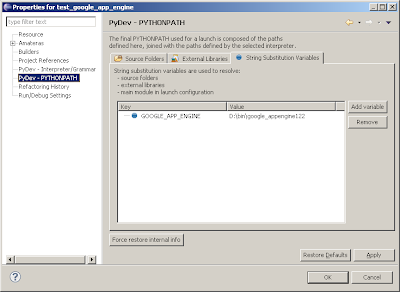
From there it gets the settings needed to create a GOOGLE_APP_ENGINE string substitution variable (that's also something new in 1.4.6: you can configure the PYTHONPATH of your project using variables) and the paths for the external libraries to be added to the PYTHONPATH of the new project.


Choose a template to start the project

Do you want a different quick start? If you think there's a common project structure that's missing, please send me a zip of the project with that structure to be added to the plugin (with a brief description for it).


After that, with the project created, you can use the Pydev Google App Engine specific actions by right-clicking the folder that has the app.yaml file (see number 1 in the image). From there you can launch it (number 2) or manage it (number 3).


To upload your application to Google App Engine, open the dialog below (from choosing "Pydev: Manage project in Google App Engine") and click 'Run' (or choose/enter another command). If a username or password or any other input is requested, enter it in the text-field and press 'Enter command' (it should properly echo the password as '*' -- if there's some situation where it's not echoing the char and it should, please enter a bug report).


It's also interesting to note that any existing project can be configured as a Pydev Google App Engine project (thus having those actions) by specifying a GOOGLE_APP_ENGINE string substitution variable in the Pydev Project properties -- and don't forget that the actions should be executed on the directory that contains your app.yaml file.
Sunday, April 12, 2009

Pydev 1.4.5 released

First, I'd like to thank those that took the time to test Pydev before the official release (some bugs were fixed because of those reports).

This release had quite some work on the Python grammar error handling. The major difference for Pydev users is that operations that require a valid AST to be performed should be more reliable -- and a bit faster -- when syntax errors are present in the code (e.g.: showing the outline; requesting a code-completion -- previously some text-manipulations were performed to make a valid AST, but this was not very reliable and also required more resources, as it tried to reparse the whole buffer after each text manipulation).

The code formatter also had some work. Particularly, four requests that popped up now and then are now available:

- A context menu is provided for folders so that all files under it can be (recursively) formatted
- The code-formatting can be automatically applied when saving the editor
- A new line can be added at the end of files
- Whitespaces can be trimmed

One other area I believe deserves some attention is the Pydev Package Explorer, which was improved so that working sets can be shown as top-level items and folders without '__init__.py' have a regular folder icon (instead of a package icon).

And as regularly, bug-fixes and other minor features were made available (see the Pydev homepage for more details)

Saturday, April 04, 2009

Extended VS Presentation

Over the last days I've been trying a new skin to Eclipse:

http://code.google.com/p/skin4eclipse

and it's pretty nice. It did have some minor quirks, like not being able to use ctrl+page up/down to traverse the editors and some other minors, but as it's open source, I was able to add the things I was missing -- which have already been incorporated by Andrei, who is the author of the plugin (those were changed when the current release was 1.5.1, so, it'll be only available in a later release).

It's pretty nice that it keeps track of the editors that were recently closed (so, you can reopen them) and it maintains the order of the tabs when the editors are closed (a.k.a: MRU bug). Also, it uses less space for the editor name, so, you can see more opened tabs at the same time.

The colors and fonts can also be configured (for me the default colors drew too much attention to the titlebar).

The only thing I still wasn't able to figure is if the presentation can prevent detached tabs to be closed with ESC (that's something that really bothers me, because I usually leave a detached tab for the console in a separate monitor, and now and then those end up being closed accidentally with ESC) -- but the default presentation has the same issue (I'm not even sure if there's a way around that).

Update: I've just sent a patch to add an option to prevent ESC from closing detached editors :)

Monday, March 30, 2009

New Pydev release soon (call for testers)

A new Pydev release should be available pretty soon... if no critical bugs are found, the current nightly build -- version 1.4.5.2712 -- will be the released version.

So, whoever is interested in the next release, please get the latest nightly build -- http://pydev.blogspot.com/2009/02/pydev-nightly-builds.html -- and check it to see if everything is working fine (so that I can provide fixes for any critical bug found before it's actually officially released).

Note that this is an attempt to have released versions more stable -- because even with a good test suite and some days of manual testing before an actual release, now and then there are still critical bugs slipping (there are way too many different scenarios and use-cases in which Pydev is used)

Sure, it's nothing like the 1-2 months of testing Eclipse goes through before a release... Actually, from submitting something up to approval in Eclipse, it usually means 6-10 months for it to be in a final release... for instance: I've just submitted a rather minor patch to make the word completion (Emacs-Style) faster -- but it'll only be patched for Eclipse 3.6... meaning that with luck it'll be available 10 months from now (because it's in API freeze now and in 2 days will stay at feature freeze and will get its 1-2 months of testing) -- but on the bright side, I can patch my own version :)