A doubt that arises sometimes is how to use Pydev with virtualenv, so, here we go...
For those that don't know about it, virtualenv is a Python tool that allows one to configure a new Python interpreter that's 'sandboxed' based on an existing interpreter.
Sample use of virtualenv:
Say you have an interpreter in d:\bin\python26 (with easy_install in place).
You could do d:\bin\python26\scripts\easy_install.exe virtualenv to install virtualenv and later do:
d:\bin\Python26\Scripts\virtualenv.exe d:\bin\Python26django, which would create a new Python install at d:\bin\Python26django.
Later, you could add new libraries just at that Python install without disturbing the base install.
E.g.:
d:\bin\Python26django\Scripts\easy_install-2.6.exe django would install django at that interpreter without changing the default one.
Now, as far as Pydev is concerned, there's nothing special in configuring a regular interpreter or an interpreter available through virtualenv. It's just a matter of following the default steps (available at http://pydev.org/manual_101_interpreter.html) but pointing to the interpreter created by virtualenv (in this case d:\bin\Python26django\scripts\python.exe).
Note: For linux users, the instructions should be similar, but the created folder by virtualenv doesn't put the interpreter at a 'scripts' folder, but at a 'bin' folder.
Update: Note that when selecting a virtualenv interpreter, the folders from the base install won't come checked by default when adding the interpreter, so, those have to be manually selected.
Wednesday, April 07, 2010

Thursday, April 01, 2010
Pydev 1.5.6 released / Django integration available
Pydev 1.5.6 has just been released (it's the same version as the last nightly build, so, if you were already in the last nightly build, there will be no upgrade available).
As commented before, the major highlight in this release is the Django integration.
There are more details on that at: http://pydev.org/manual_adv_django.html
Other additions worth commenting are:
* The go to definition (F3) now works with unsaved buffers
* Some improvements were done in the auto-edition to automatically close literals
* On backspace, the closing literal or parenthesis may be deleted
* Ctrl+2+s word to search can be used to search for a string in open editors (and that can no longer be done through the find/replace dialog)
Enjoy.
Tuesday, March 23, 2010
Django on Pydev (take #2)
It's nice that the previous post on Django on Pydev made so many people happy :)
There were many comments and I decided for writing a separate post to answer those and explain a bit better what should be the final state of the integration.
1. Django templates
There will be a special editor for that, but this will not be in the next release. This editor will be based upon the new Aptana Studio 3 (if you don't know about it, there's a preview explaining it at http://vimeo.com/channels/radrails#9895797). Initially it may be simpler (at least syntax highlighting and outline) and it should shape to have code-completion and other features in the future.
2. Custom Django actions
A new nightly has just been pushed with support for any custom action to manage.py. There's still room for improvement, like automatically going through the manage.py help and executing a command or asking help on that, but this won't be available for the upcoming release.
3. Code Analysis of Django
Most things should work as it is now, but I'm waiting for bug-reports saying what exactly Pydev fails to acknowledge on Django.
And that's it for the current plans... if there are more suggestions, they're very welcome!
Sunday, March 21, 2010
Django on Pydev
The current nightly build (which will be 1.5.6) is already providing some special support for Django (special thanks to Leo Soto for providing a good base for building upon).
There are still some details until the final release, but I'd like to get some feedback before that.
The special support goes in the following:
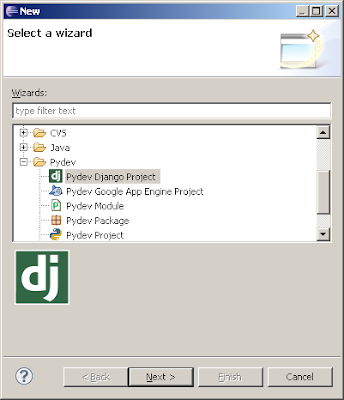
1. Create a 'Pydev Django' project (will use django to create a manage.py, settings.py and urls.py)
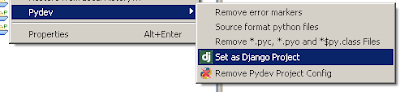
2. For an existing project, just right click it and choose 'Pydev > Set as Django project)'
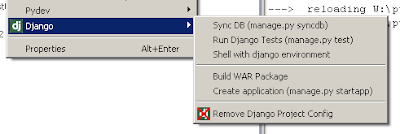
3. Custom Django actions can be accessed right clicking a project with the Django config and choosing Django > action.
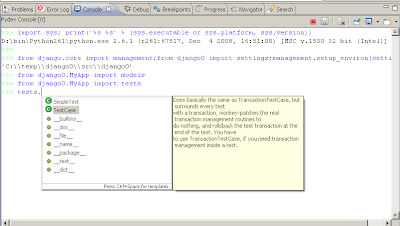
4. Note that the Shell with django environment will create a shell properly configured with your settings, providing the default features from the pydev shell, such as code completion, history, context assistants (ctrl+1), etc (see: http://pydev.org/manual_adv_interactive_console.html for more details)
5. Run as Django/Debug as Django are available (note that they set the --no-reload by default, otherwise the debugger may have some issues and other processes may be kept alive when closing the process spawned by Pydev).
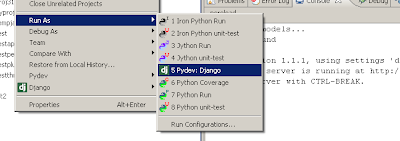
And that's it. It's all there in the nightly build already (I still have some features and minor adjustments to do, but that should already give a good idea of what will be available, and I'm waiting for feedback to know if there's something missing that really should be there).
There are still some details until the final release, but I'd like to get some feedback before that.
The special support goes in the following:
1. Create a 'Pydev Django' project (will use django to create a manage.py, settings.py and urls.py)

2. For an existing project, just right click it and choose 'Pydev > Set as Django project)'

3. Custom Django actions can be accessed right clicking a project with the Django config and choosing Django > action.

4. Note that the Shell with django environment will create a shell properly configured with your settings, providing the default features from the pydev shell, such as code completion, history, context assistants (ctrl+1), etc (see: http://pydev.org/manual_adv_interactive_console.html for more details)

5. Run as Django/Debug as Django are available (note that they set the --no-reload by default, otherwise the debugger may have some issues and other processes may be kept alive when closing the process spawned by Pydev).

And that's it. It's all there in the nightly build already (I still have some features and minor adjustments to do, but that should already give a good idea of what will be available, and I'm waiting for feedback to know if there's something missing that really should be there).
Tuesday, March 02, 2010
Preparing for upcoming release (testers needed)
Pydev 1.5.5 is getting near a new release. The current nightly build (1.5.5.2010030222) should be the released version if no critical bugs are found until Thursday.
The major highlights for this release are:
1. The contents of the interpreter PYTHONPATH are all shown in the Pydev Package explorer (so, the contents of those modules can be seen, including zip file contents)
2. Predefined completions can be used in Pydev. Those are plain Python 3.0 files with the interface for modules, and there's a choice where Pydev creates those files from QScintilla .api files (see: unpublished instructions at git for more details)
3. The find/replace dialog in Pydev has a new button which can be used for finding the current string being searched for in the currently opened editors (although because of an Eclipse limitation it doesn't work on external files, just editors opened with files under a project).
4. Improved hover support for compiled modules.
Well, that's it for this release.
For the next release, the focus will be on a special Django integration in Pydev.
Leo Soto has been working for some time on it already and I was eagerly waiting for it (available at http://github.com/leosoto/Pydev/tree/bingo), so, the next release will be integrating that branch into Pydev and making it as smooth as possible for Django developers inside of Pydev.
Subscribe to:
Posts (Atom)