Pydev 1.4.8 has been released (a few days ago).
The usability improvements on this release had already been highlighted before, so, I think that the major highlight to talk about is the possibility of 'live coding' in the debugger (although it's still a bit on the experimental side).
To enable that, 2 features were done: Jump to line (ctrl+R with the focus on the line) and reload module contents (right now only available for python 2.x).
The idea is that you can get to some point in your code in the debugger, watch what's happening, change the code to fix it and then jump to the line that created that frame (so, you actually need to do a jump to an outer frame -- which actually requires finishing the current frame, as python has no support for dropping a frame -- although you can jump to the return line and then jump in the outer frame to the caller of that frame -- yes, it can be a bit confusing).
Note that there are still a number of shortcomings in the current version -- some because of python, which can only make a jump when the debugger receives a line event (so, if you were at the end of the frame, it might be that you cannot properly do the jump, because a return event will be available in that case, instead of a line event, and being inside a try..except has its peculiarities too), and others because the reload is still pretty naive (it uses the xreload module -- currently only available for 2.x -- but I already have some ideas that can make it better).
So, in the current version, it can be a bit difficult to use it properly, but still, it's pretty nice when it does :)
p.s.: I was going to provide a screencast for that, but decided on waiting a bit more until I'm able to work on some of the rough edges in the current implementation.
p.s2.: The jump to line in python can only jump inside the current topmost frame, but in pydev you can ask to make a jump to any place in the stack, but that means it'll execute everything normally until it gets to the frame where the jump was asked -- and only then will it actually execute the jump -- maybe if there's enough interest in that, someone at the python side could provide a way to drop frames :)
Friday, August 21, 2009

Monday, August 03, 2009
Twitter, Pydev homepage & Usability improvements
I've recently started to Tweet to reporting on what's happening in Pydev (http://twitter.com/fabiofz), so, it might be worth for those that want to get on the bits & pieces around the unreleased version.
Now, on with what's happening in the Pydev world: the Pydev and the Pydev Extensions homepages were updated -- yes, they were outdated in a number of things -- Pydev is evolving too fast for them to keep up :)
It was pretty nice that while going over the editors/details to explain them on the homepage, I ended up reorganizing things and improving the usability as a direct result of that (I think it's much easier/better to code and give a better interface than to explain why something doesn't actually work some way in minor details).
So, hopefully those usability improvements will make the lives easier for people using Pydev (and for those starting up too).
I've already published the homepage with screeshots of those improvements, but right now, they're only available in the nightly build (and will be released at 1.4.8)
Some of those usability improvements are:
Some rough edges are probably still lurking around, but hopefully it has become harder to spot those :)
Now, on with what's happening in the Pydev world: the Pydev and the Pydev Extensions homepages were updated -- yes, they were outdated in a number of things -- Pydev is evolving too fast for them to keep up :)
It was pretty nice that while going over the editors/details to explain them on the homepage, I ended up reorganizing things and improving the usability as a direct result of that (I think it's much easier/better to code and give a better interface than to explain why something doesn't actually work some way in minor details).
So, hopefully those usability improvements will make the lives easier for people using Pydev (and for those starting up too).
I've already published the homepage with screeshots of those improvements, but right now, they're only available in the nightly build (and will be released at 1.4.8)
Some of those usability improvements are:
- Preview of the color options chosen
- Preview of the code formatting chosen
- Preview of changing the code style
- Preview of block comments
- Auto imports properly working when the editor changes (ctrl+shift+O in Pydev Extensions)
- Hover works on markers when the editor changes
- A Pydev (Jython) project can coexist with a JDT project (and properly use its info -- only project references worked previously)
- Improved error messages for Iron Python not being version 2.6
- The interactive console no longer halts the UI thread
Some rough edges are probably still lurking around, but hopefully it has become harder to spot those :)
Saturday, July 25, 2009
Creating a dark theme (and exporting and importing Eclipse preferences)
Usually I use my colors with the default settings that Eclipse provides, but I know many people that like alternative appearances for Eclipse (usually using a dark theme), so, I decided to give it a try...
For changing the default colors, there are some places that you have to look through in the window > preferences menu:
To do that, go to File > Export > Preferences and export all the preferences to a file, then, open that file and remove all the non-color related preferences (except the file_export_version, which Eclipse requires when doing the import) -- note that you can keep other preferences you enter all the time too, and it might be easier doing it with a clean Eclipse install just with what you want to config (so that you don't have too many preferences in that preferences file).
Later, you can import those preferences in Eclipse through File > Import > Preferences.
The preferences for the dark theme I'm using gives the result below (note that you may have to restart Eclipse so that the left ruler looks correct):
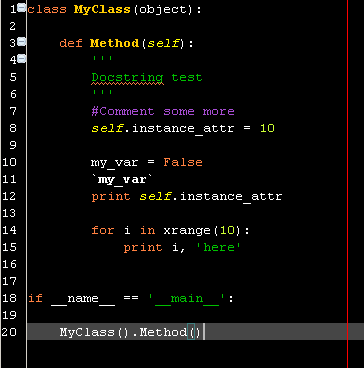
This can be reproduced by saving the contents below in a 'dark_theme.epf' file (the extension stands for eclipse preferences file) and importing it.
file_export_version=3.0
/instance/org.python.pydev/BACKQUOTES_COLOR=255,255,255
/instance/org.python.pydev/COMMENT_COLOR=153,51,204
/instance/org.python.pydev/CODE_COLOR=255,255,255
/instance/org.python.pydev/NUMBER_COLOR=204,255,51
/instance/org.python.pydev/CLASS_NAME_COLOR=255,204,0
/instance/org.python.pydev/KEYWORD_COLOR=255,102,0
/instance/org.python.pydev/SELF_COLOR=255,255,0
/instance/org.python.pydev/FUNC_NAME_COLOR=255,204,0
/instance/org.eclipse.ui.editors/AbstractTextEditor.Color.SelectionForeground.SystemDefault=false
/instance/org.eclipse.ui.editors/AbstractTextEditor.Color.Background.SystemDefault=false
/instance/org.eclipse.ui.editors/AbstractTextEditor.Color.Background=0,0,0
/instance/org.eclipse.ui.editors/AbstractTextEditor.Color.Foreground.SystemDefault=false
/instance/org.eclipse.ui.editors/AbstractTextEditor.Color.Foreground=255,255,255
/instance/org.eclipse.ui.editors/AbstractTextEditor.Color.SelectionBackground.SystemDefault=false
/instance/org.eclipse.ui.editors/AbstractTextEditor.Color.SelectionBackground=0,0,136
/instance/org.eclipse.ui.editors/pydevOccurrenceIndicationColor=128,64,0
/instance/org.eclipse.ui.editors/lineNumberColor=255,255,255
/instance/org.eclipse.ui.editors/printMargin=true
/instance/org.eclipse.ui.editors/printMarginColor=255,0,0
/instance/org.eclipse.ui.editors/currentLineColor=70,70,70
/instance/org.eclipse.ui.editors/currentIPTextStyle=BOX
/instance/org.eclipse.ui.editors/currentIPIndication=true
/instance/org.eclipse.ui.editors/currentIPHighlight=false
/instance/org.eclipse.ui.editors/secondaryIPTextStyle=DASHED_BOX
/instance/org.eclipse.ui.editors/secondaryIPHighlight=false
/instance/org.eclipse.ui.editors/secondaryIPIndication=true
Update: Added the debug call stack and debug current line annotations to appear as dashed box and box.
For changing the default colors, there are some places that you have to look through in the window > preferences menu:
- General > Editors > Text Editors (to set the background color / selection color, etc. for all editors)
- General > Editors > Text Editors > Annotations (to set the colors for the occurrences highlight, tasks, etc.)
- Pydev > Editor (to set the pydev editor-related colors)
- General > Appearance > Colors an Fonts (to set what's not available in the other places)
To do that, go to File > Export > Preferences and export all the preferences to a file, then, open that file and remove all the non-color related preferences (except the file_export_version, which Eclipse requires when doing the import) -- note that you can keep other preferences you enter all the time too, and it might be easier doing it with a clean Eclipse install just with what you want to config (so that you don't have too many preferences in that preferences file).
Later, you can import those preferences in Eclipse through File > Import > Preferences.
The preferences for the dark theme I'm using gives the result below (note that you may have to restart Eclipse so that the left ruler looks correct):

This can be reproduced by saving the contents below in a 'dark_theme.epf' file (the extension stands for eclipse preferences file) and importing it.
file_export_version=3.0
/instance/org.python.pydev/BACKQUOTES_COLOR=255,255,255
/instance/org.python.pydev/COMMENT_COLOR=153,51,204
/instance/org.python.pydev/CODE_COLOR=255,255,255
/instance/org.python.pydev/NUMBER_COLOR=204,255,51
/instance/org.python.pydev/CLASS_NAME_COLOR=255,204,0
/instance/org.python.pydev/KEYWORD_COLOR=255,102,0
/instance/org.python.pydev/SELF_COLOR=255,255,0
/instance/org.python.pydev/FUNC_NAME_COLOR=255,204,0
/instance/org.eclipse.ui.editors/AbstractTextEditor.Color.SelectionForeground.SystemDefault=false
/instance/org.eclipse.ui.editors/AbstractTextEditor.Color.Background.SystemDefault=false
/instance/org.eclipse.ui.editors/AbstractTextEditor.Color.Background=0,0,0
/instance/org.eclipse.ui.editors/AbstractTextEditor.Color.Foreground.SystemDefault=false
/instance/org.eclipse.ui.editors/AbstractTextEditor.Color.Foreground=255,255,255
/instance/org.eclipse.ui.editors/AbstractTextEditor.Color.SelectionBackground.SystemDefault=false
/instance/org.eclipse.ui.editors/AbstractTextEditor.Color.SelectionBackground=0,0,136
/instance/org.eclipse.ui.editors/pydevOccurrenceIndicationColor=128,64,0
/instance/org.eclipse.ui.editors/lineNumberColor=255,255,255
/instance/org.eclipse.ui.editors/printMargin=true
/instance/org.eclipse.ui.editors/printMarginColor=255,0,0
/instance/org.eclipse.ui.editors/currentLineColor=70,70,70
/instance/org.eclipse.ui.editors/currentIPTextStyle=BOX
/instance/org.eclipse.ui.editors/currentIPIndication=true
/instance/org.eclipse.ui.editors/currentIPHighlight=false
/instance/org.eclipse.ui.editors/secondaryIPTextStyle=DASHED_BOX
/instance/org.eclipse.ui.editors/secondaryIPHighlight=false
/instance/org.eclipse.ui.editors/secondaryIPIndication=true
Update: Added the debug call stack and debug current line annotations to appear as dashed box and box.
Wednesday, July 08, 2009
Pydev 1.4.7 released
Pydev 1.4.7 is now available for download.
Aside from the regular update site, there are new mirrors for getting pydev/pydev extensions, so the update site mirrors are available as follows:
http://fabioz.com/pydev/updates (contains both, pydev and pydev extensions)
http://pydev.sf.net/updates (contains only pydev)
http://update.aptana.com/update/pydev/3.2 (contains only pydev)
http://update.aptana.com/update/pydev-pro/3.2 (contains only pydev extensions)
The major features (Iron Python integration and the new way of running as unit-test / running the current editor with the configured nature) were previously discussed in the following post: http://pydev.blogspot.com/2009/06/testing-on-pydev-147-ironpython.html and are now available in this release.
Note that the Iron Python debugger is still not available in this release, but it seems that the next release of Iron Python will have the sys.settrace() support, so, there's a chance that the next Pydev version has a debugger for it.
Aside from those features, other noteworthy things in this release are:
Aside from the regular update site, there are new mirrors for getting pydev/pydev extensions, so the update site mirrors are available as follows:
http://fabioz.com/pydev/updates (contains both, pydev and pydev extensions)
http://pydev.sf.net/updates (contains only pydev)
http://update.aptana.com/update/pydev/3.2 (contains only pydev)
http://update.aptana.com/update/pydev-pro/3.2 (contains only pydev extensions)
The major features (Iron Python integration and the new way of running as unit-test / running the current editor with the configured nature) were previously discussed in the following post: http://pydev.blogspot.com/2009/06/testing-on-pydev-147-ironpython.html and are now available in this release.
Note that the Iron Python debugger is still not available in this release, but it seems that the next release of Iron Python will have the sys.settrace() support, so, there's a chance that the next Pydev version has a debugger for it.
Aside from those features, other noteworthy things in this release are:
- the debug console can be used with the remote debugger (pydev extensions)
- the auto-config was fixed
- context-independent completions are now offered when the type inference is not able to get context-dependent completions on a given token (pydev extensions)
- the google app engine integration had some fixes
Sunday, June 28, 2009
Testing on Pydev 1.4.7 & IronPython
Pydev 1.4.7 is now ready to be tested for a new release (watch for the nightly build with svn version 2834 -- http://pydev.blogspot.com/2009/02/pydev-nightly-builds.html )
One of the major features in this release is the IronPython integration. Note that it requires IronPython 2.6 (earlier versions are not supported because of the lack of sys._getframe()).
In that integration, code-completion should be working for the .NET libraries and other dlls. For the .NET libraries, just make sure that the library you're using is listed in the forced builtins ( http://fabioz.com/pydev/manual_101_interpreter.html ) -- I believe all libraries should be there already, but it could be that some default library is missing.
To use code-completion for other libraries, the code must be compiled as a dll (because Pydev does not recognize C# nor VB) and that dll must have the exact same name of the namespace it contains (e.g.: if you want to do "import iTextSharp", the dll must be named iTextSharp.dll -- the case of the file important there) and the folder containing that dll must be added as a source folder (or external source folder) -- which is the same thing for python compiled extensions.
Most features should be working fine with IronPython, with the most notable exception being that the debugger is not supported (that's because in this version, IronPython still doesn't provide sys.settrace(), so, there's no API to work on for python debugging).
Other niceties were also added in this release:
One of the major features in this release is the IronPython integration. Note that it requires IronPython 2.6 (earlier versions are not supported because of the lack of sys._getframe()).
In that integration, code-completion should be working for the .NET libraries and other dlls. For the .NET libraries, just make sure that the library you're using is listed in the forced builtins ( http://fabioz.com/pydev/manual_101_interpreter.html ) -- I believe all libraries should be there already, but it could be that some default library is missing.
To use code-completion for other libraries, the code must be compiled as a dll (because Pydev does not recognize C# nor VB) and that dll must have the exact same name of the namespace it contains (e.g.: if you want to do "import iTextSharp", the dll must be named iTextSharp.dll -- the case of the file important there) and the folder containing that dll must be added as a source folder (or external source folder) -- which is the same thing for python compiled extensions.
Most features should be working fine with IronPython, with the most notable exception being that the debugger is not supported (that's because in this version, IronPython still doesn't provide sys.settrace(), so, there's no API to work on for python debugging).
Other niceties were also added in this release:
- Ctrl+F9 (which was previously a run as jython) now executes a run as unit-test based on the project type, providing an interface where the user can filter which tests should be run, and F9 which was a run-as python is now a run as current project type -- so, it works for python, jython and ironpython projects).
- Pydev Extensions context-insensitive completions are shown for any token which cannot be determined by the type inference engine (previously it did that only for method parameters) -- and the number of chars for showing those completions can be customized (by default, 2 chars are required).
Subscribe to:
Posts (Atom)